MediaBlaster
Bunny Stream is our best overall starting point for most indie OTT owners who want affordable hosting without managing an AWS video pipeline.
Its included standard encoding and usage-based pricing make budgeting straightforward. However, CloudFront’s flat-rate plans can make AWS cheaper for some established workloads. Vimeo is worth considering for lighter viewing or a bundled OTT business—not as an assumption of unlimited cheap delivery.
The right choice depends on viewing hours, audience location, encoding requirements, and how much technical work you want to own.
Pricing checked September 23, 2026. Prices are in USD, before tax. This comparison focuses on prerecorded, on-demand video, not a 24/7 live channel. Recommendations reflect published capabilities and modeled costs, not a controlled speed benchmark.
Video hosting pricing at a glance
For an independent film channel, niche sports archive, or creator-owned streaming service, start with this distinction:
| Option | What you are buying | Our recommended fit |
|---|---|---|
| Bunny Stream | Managed video storage, encoding, and delivery | A small team that wants a simple video infrastructure bill |
| AWS: S3 + MediaConvert + CloudFront | Separate services you configure into a video pipeline | An owner with technical support who wants control and can optimize the architecture |
| Vimeo hosting | A hosted-video subscription with storage and bandwidth allowances | A smaller audience, embedded video, and production or collaboration workflows |
| Vimeo OTT | A broader streaming-business platform with monetization tools | A business buying a storefront and operational convenience, rather than delivery alone |
These are not identical products. The service descriptions and current offers are documented by Bunny Stream, AWS’s video-on-demand architecture, Vimeo hosting, and Vimeo OTT (now shut down!!).
Compare both the infrastructure bill and the work required to turn that infrastructure into your channel.
The number that matters most: how much people watch
Uploading a movie and delivering that movie are different costs. A useful video hosting budget separates:
Storage: The files you retain, including originals, playback versions, and backups.
Encoding: Converting source footage into the versions your viewers can play.
Delivery: Sending the selected playback version to each viewer.
For a planning estimate:
Monthly delivery in decimal GB
≈ total viewer-hours × average delivered bitrate in Mbps × 0.45
At an average 4 Mbps, including audio, one viewer-hour consumes approximately 1.8 GB. That means 1,000 people watching five hours each generate roughly 9,000 GB of delivery.
This is arithmetic, not a promise about a particular encoding preset. Adaptive playback, abandoned views, retries, captions, and protocol overhead affect real usage. Use the average bitrate actually delivered—not the maximum resolution advertised on your homepage.
You also do not multiply delivery by every available rendition. If a viewer watches the 720p version, they do not normally download the complete 360p, 480p, and 1080p copies too. Those additional versions primarily expand the stored library and encoding workload.
Bunny.net video hosting pricing
Use Bunny Stream, not a bare storage quote
For this comparison, the relevant product is Bunny Stream. Its published offer combines video storage, standard encoding, delivery, and a web player. Quoting Bunny Storage alone would leave out the work needed to prepare and serve adaptive video.
The base storage price is $0.01 per GB per month in the default Frankfurt region. One additional storage region makes the combined rate $0.02/GB; two additional regions make it $0.025/GB. These are storage-replication charges, not CDN bandwidth charges. See the Stream storage pricing.
A library occupying 1,000 GB therefore starts at $10/month for storage, before delivery and optional services.
Standard versus Volume delivery
Bunny’s CDN pricing lists these entry-level delivery rates:
| Network / delivery region | Price per GB |
|---|---|
| Standard: North America and Europe | $0.010 |
| Standard: Asia and Oceania | $0.030 |
| Standard: South America | $0.045 |
| Standard: Middle East and Africa | $0.060 |
| Volume: worldwide, first 500 TB/month | $0.005 |
Bunny does not add a separate CDN request fee, and its account minimum is $1/month, rather than a $1 surcharge on top of normal usage. See its CDN pricing terms.
The important performance distinction is that Standard uses Bunny’s full delivery network; Volume uses a smaller network selected for high-volume delivery. Volume is not automatically unsuitable for streaming, but it is not an identical network at half the price. Bunny explains the two delivery tiers here.
Our approach: price both, then test actual playback in your audience’s regions. For a geographically mixed audience, calculate a weighted delivery rate instead of applying North American pricing to everyone.
Free encoding has practical limits
Bunny’s free encoding documentation describes a shared queue. Large migrations or busy periods can take hours or multiple days to process. That may be acceptable for a film archive, but not for an event replay that must publish immediately.
Storage also grows with enabled resolutions, retained originals, MP4 fallbacks, and associated assets. Uploading 500 GB does not necessarily produce a 500 GB hosted library. Enable original-file retention before uploading when you need Bunny to preserve those masters for later re-encoding.
Premium Encoding is optional. Its dedicated guide lists $0.025/minute for SD, $0.05 for HD, and $0.15 above 1080p, per codec. However, that guide describes a maximum-resolution price including lower renditions, while the general pricing page describes per-output billing. Confirm which calculation applies to your jobs before budgeting a large paid batch. Our examples below use free standard encoding and do not depend on resolving that discrepancy. Sources: Premium Encoding and general Stream pricing.
Optional extras also matter: AI transcription is listed at $0.10 per language-minute, and Enterprise DRM starts at $99/month per video library plus license charges. Neither is included in our baseline. Check the current add-on rates.
Bunny’s strongest selling point is a manageable workflow—not a claim that every feature is free or every upload becomes playable immediately.
AWS video hosting pricing: the complete core stack
An S3 storage price is not an AWS video hosting price.
For a straightforward managed video-on-demand setup, the core path is:
Upload masters to S3
→ MediaConvert creates adaptive playback files
→ S3 stores those outputs
→ CloudFront delivers them to viewers
AWS’s reference architecture adds automation and monitoring around this path. You do not need an always-running EC2 server simply to store, encode, and deliver prerecorded video.
Every cost category to include
| Component | Why it is there | How to budget it |
|---|---|---|
| S3 Standard storage | Stores masters and encoded outputs | Example US East rate: $0.023 per billed GB/month in the first storage tier |
| MediaConvert | Creates the adaptive video renditions | Charge for normalized output minutes; worked example below |
| CloudFront | Delivers video to viewers | Compare pay-as-you-go with an eligible flat-rate plan |
| S3 operations | Writes encoded files and serves origin reads | Example Standard rates: $0.005/1,000 PUT requests and $0.0004/1,000 GET requests |
| Workflow automation | Starts jobs, handles retries, updates your CMS | Optional Lambda, Step Functions, and messaging charges, depending on implementation |
| Monitoring and delivery configuration | Logs, alerts, DNS, certificates, and protection | Some CloudFront plan features are bundled; extra services and retention can remain billable |
| Backup and advanced media features | Extra copies, DRM licensing, specialized packaging, or advertising systems | Additional architecture-dependent costs—not included merely because you use AWS |
Sources: S3 pricing, AWS’s VOD cost guide, MediaConvert pricing, and CloudFront pricing.
For perspective, 1,000 decimal GB is approximately 931 GiB. At $0.023 per GiB, that is about $21.42/month in S3 Standard storage, not the whole hosting bill. AWS explicitly meters S3 storage in binary gigabytes.
Keep your source storage, encoding jobs, and output storage in the same selected AWS region where practical. Price any cross-region transfers and replication separately. Do not add ordinary S3 internet egress a second time to the same S3-to-CloudFront-to-viewer path: AWS documents that transfer from AWS origins to CloudFront is waived. Origin requests still count.
What encoding costs on AWS
Using the published US East (Ohio) Basic example rate of $0.0075 per normalized output minute, AVC/H.264 outputs at up to 30 fps use a 1× multiplier for SD and 2× for HD. These rates and multipliers come from MediaConvert’s pricing table.
For a ladder containing 360p, 480p, 720p, and 1080p:
1 source minute × (1 + 1 + 2 + 2) × $0.0075
= $0.045 per source minute
= $2.70 per source hour
That makes 10 new source hours approximately $27 to encode. A one-time 100-hour back-catalog import would be approximately $270 at the same settings and within the initial rate tier.
Existing videos are not charged for encoding again every month unless you reprocess them. Different codecs, frame rates, resolutions, quality settings, or MediaConvert tiers change the calculation.
CloudFront pay-as-you-go
The published North American and European delivery schedule includes a monthly 1 TB free allowance, then $0.085/GB for the next 9 TB and $0.080/GB for the next 40 TB. Other delivery regions have different rates.
There is also a monthly allowance of 10 million HTTP/HTTPS requests; additional US HTTPS requests are listed at $0.01 per 10,000. The free allowances are account-wide, not a fresh allocation for every distribution. CloudFront’s FAQ explains the free tier.
That is why traditional AWS delivery can become expensive for a successful channel. It is also why comparing only these rates is now incomplete.
CloudFront flat-rate plans change the answer
AWS currently lists these monthly CloudFront plans:
| Plan | Monthly price | Monthly delivery allowance | Monthly request allowance | S3 Standard storage credit |
|---|---|---|---|---|
| Free | $0 | 100 GB | 1 million | 5 GB |
| Pro | $15 | 50 TB | 10 million | 50 GB |
| Business | $200 | 50 TB | 125 million | 1 TB |
| Premium | $1,000 | 50 TB at the base level | 500 million at the base level | 5 TB |
The plan documentation also covers eligibility, supported features, and higher configurable Premium allowances.
These are per-distribution plans, not a blanket cap on your entire AWS bill. S3 beyond the credit, MediaConvert, origin requests, and nonincluded services still cost money. Included features can cover associated WAF protection, qualifying DNS, and specified log ingestion.
No overage charge does not mean unlimited guaranteed performance. AWS says sustained or unusually high excess usage can result in delivery adjustments. Historical usage can also affect plan eligibility. Check both the feature requirements and the usage policy.
For OTT, request count deserves particular attention. In our illustrative six-second HLS setup, with audio and video together in each segment:
3,600 seconds ÷ 6 seconds = 600 segment requests per viewer-hour
12,000 viewer-hours × 600 = 7.2 million segment requests
Manifests, captions, retries, and other requests come on top. Separate audio segments or shorter segments can increase the count substantially. You can outgrow Pro’s request allowance before its transfer allowance.
The smaller AWS bills—and the work behind them
Automation is useful, but not mandatory for every small library. Lambda charges by requests and execution duration, with a published monthly free allowance; Step Functions charges according to workflow type and usage. Logs, alerts, and optional queues add implementation-specific costs.
For already packaged VOD files, do not automatically add MediaLive, IVS, MediaPackage, or an EC2 fleet to the estimate. Choose additional services because your requirements need them, not because they appear in a media architecture diagram. AWS’s VOD architecture is a useful reference, not a requirement to deploy every component.
More importantly, somebody must configure permissions, encoding presets, caching, error handling, access protection, and monitoring. Include that person’s time in the decision.
Vimeo video hosting pricing
Ordinary Vimeo hosting plans
Vimeo’s public pricing page currently displays:
| Plan | Published starting rate* | Storage allowance | Monthly bandwidth |
|---|---|---|---|
| Starter | $12 per seat/month | 2 TB | 2 TB |
| Standard | $25 per seat/month | 4 TB | 2 TB |
| Advanced | $75 per seat/month | 7 TB | 2 TB |
| Enterprise | Custom quote | Custom | Custom |
These are the displayed starting rates, not a guarantee of a cancellable month-to-month price. Confirm the billing commitment, seats, regional pricing, and total charged at checkout. Existing or legacy accounts can differ.
For an independent TV app, Standard is the relevant starting comparison, because Vimeo lists third-party player support there. An embedded Vimeo player and an app consuming a playback URL are different integration requirements. Increasing the plan for additional storage or production features does not increase the published self-serve bandwidth allowance.
What Vimeo’s 2 TB threshold means for OTT
Vimeo defines its monthly threshold as 2,000 GB. Its bandwidth policy describes notifications and follow-up to resolve sustained excess usage, potentially through a custom plan, reduced consumption, or migration. It is not a published automatic $/GB overage tariff.
At our illustrative 4 Mbps average bitrate:
2,000 GB ÷ 1.8 GB per viewer-hour
≈ 1,111 viewer-hours per month
Two hundred people watching five hours each would use about 1,800 GB. Two hundred and fifty people watching the same amount would use about 2,250 GB, before other traffic.

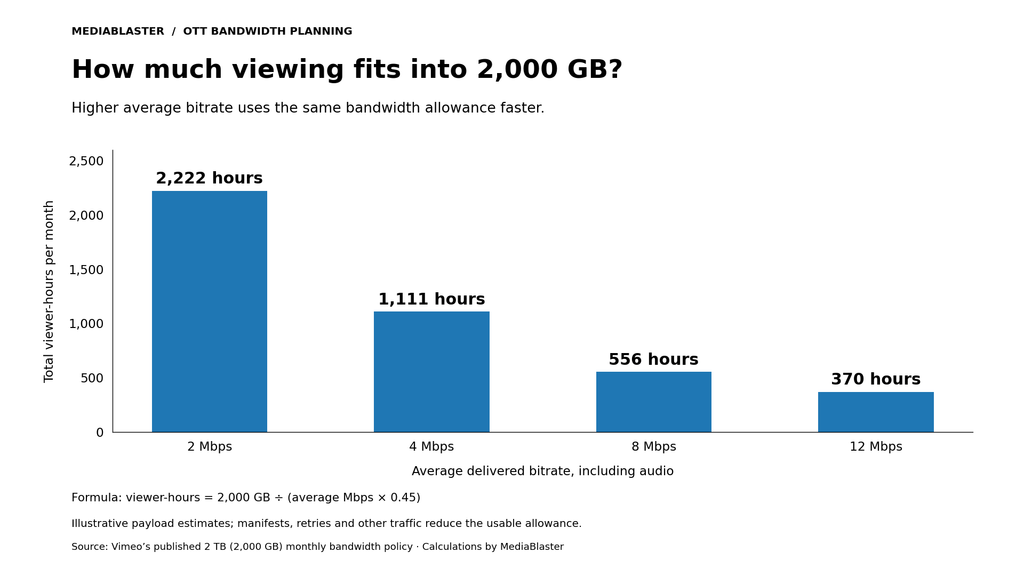
Illustration: MediaBlaster calculations using Vimeo’s 2,000 GB policy. Average bitrate includes audio; overhead reduces the usable viewing time.
Vimeo can still be good value for a large catalog with light viewing, especially when you use its production tools. The mistake is assuming the subscription remains your complete delivery cost as watch time grows.
Vimeo OTT is a separate comparison
Vimeo OTT Starter advertises $1 per subscriber per month, plus upload and transaction fees, with bandwidth included. Its one-time-purchase headline fee is 10%. Starter is web-only; branded connected-TV apps belong to the custom-priced Enterprise offer.
At 500 paying subscribers, the subscription platform fee alone would be $500/month, before the additional applicable fees. That buys more than file hosting: the offer includes a website, checkout, and customer-management functionality.
Do not compare that $500 directly with a bare CDN bill and call the entire difference waste. Equally, do not assume a low-cost regular Vimeo plan includes the complete Vimeo OTT product or a branded Roku app.
Real monthly cost examples for indie OTT channels
Here is a controlled planning comparison—not a claim that every host produces identical files or identical playback quality.
Shared workload: 1,000 decimal GB of total stored assets; 10 new source hours encoded monthly; 4 Mbps average delivered bitrate; and viewers in North America or Europe. Bunny uses one storage region and free standard encoding. AWS assumes the stated US East storage and encoding rates, co-located regional resources, the four-rendition Basic ladder, and a modeled request charge. The Vimeo catalog is assumed to fit Standard’s quota; its quota accounting is not treated as identical to raw object storage.
| Hosting configuration | 500 viewer-hours/month | 5,000 viewer-hours/month | 12,000 viewer-hours/month |
|---|---|---|---|
| Approximate delivery | 900 GB | 9,000 GB | 21,600 GB |
| Bunny Stream: Volume | $14.50 | $55.00 | $118.00 |
| Bunny Stream: Standard, North America/Europe | $19.00 | $100.00 | $226.00 |
| AWS with CloudFront Pro, if eligible | About $62 | About $62 | About $63 |
| AWS with CloudFront pay-as-you-go | About $49 | About $674 | About $1,622 |
| Vimeo Standard | **From $25*** | Custom bandwidth discussion | Custom bandwidth discussion |
Vimeo’s published starting rate is subject to the checkout qualifications above. Above-threshold columns are not zero-cost hosting and are not assumed to remain $25.

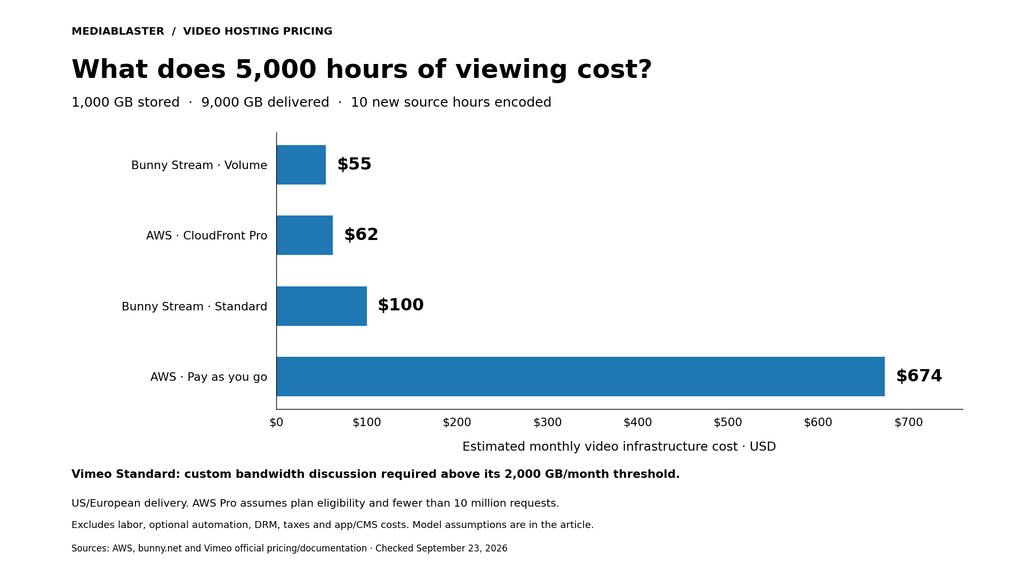
Original chart: MediaBlaster. Values use the assumptions in this section and the providers’ linked pricing sources; they exclude the additional costs described below.
How the middle example is calculated
For Bunny Standard:
Storage:   1,000 GB × $0.01 = $10.00
Encoding:  standard encoding included
Delivery:  9,000 GB × $0.01 = $90.00
Total:                         $100.00/month
Bunny Volume substitutes $0.005/GB delivery, producing $55/month.
For AWS with CloudFront Pro:
S3 storage: about 931.32 GiB, less 50 GiB plan credit
            × $0.023                          ≈ $20.27
MediaConvert: 10 source hours × $2.70          = $27.00
CloudFront Pro                               = $15.00
Modeled S3 requests                           ≈  $0.18
Core video infrastructure subtotal            ≈ $62.45/month
The AWS pay-as-you-go alternative uses approximately $21.42 of storage, $27 of encoding, $0.18 of S3 requests, and $625.42 of delivery: about $674.02.
Model details: Workload GB are decimal. AWS usage is converted to binary GiB, following S3’s billing definition and the conversion in AWS’s CloudFront cost-analysis example. For calculations, the pay-as-you-go free transfer allowance is treated as 1,024 GiB and the next tier as 9,216 GiB; Bunny GB are modeled as decimal. Verify the applicable meters and allowances against your account before forecasting an invoice.
The request estimate assumes six-second multiplexed HLS segments, a 95% origin-request cache-hit ratio, approximately 24,000 output PUTs for the monthly new footage, and the segment GETs that reach S3. Extra manifests, retries, and ancillary operations are not individually simulated. CloudFront pay-as-you-go free allowances are assumed unused elsewhere; Pro has room for additional requests in these examples, but must be checked against your complete application traffic.
These are core video infrastructure subtotals, not complete OTT business budgets. They exclude taxes, paid DRM, optional captioning, premium encoding, initial migration, extra backup copies, optional AWS automation and monitoring, support plans, WordPress hosting, app development, payment processing, and labor. Storage is a monthly snapshot; retaining new content grows future storage bills. Use the AWS Pricing Calculator for your selected region and architecture.
Which option gives the best price and performance?
Choose Bunny Stream for a small, independent team
Our default recommendation remains Bunny when you want to spend your time publishing and promoting the channel rather than operating cloud infrastructure.
In the modeled 5,000-hour workload, Volume is the cheapest option, while Standard is still inexpensive enough to test against the audience experience. The choice between those tiers should follow a playback trial—not the smallest number on the pricing page.
Choose AWS when the configuration and workload justify it
AWS deserves a serious look when you already have technical support, need specific processing controls, or fit a CloudFront flat-rate plan well.
In the 12,000-hour example, eligible AWS Pro infrastructure is cheaper than either Bunny delivery tier. The savings are real in this model, but they are not a guarantee that AWS is cheaper to operate overall.
For example, assume your additional AWS maintenance time is worth $75/hour. One extra hour per month would outweigh the roughly $55 difference between AWS Pro and Bunny Volume in that scenario. That is an illustrative labor assumption—not an AWS fee or a market-rate claim.
Choose Vimeo when you value its broader workflow
Vimeo can be sensible when watch time remains modest and its tools replace other software or administrative work. Vimeo OTT can make sense when the storefront, checkout, and platform support are what you actually need.
Neither should be rejected simply because its pricing model differs. Request a realistic quote and compare the services you would otherwise have to assemble.
Measure performance where your customers watch
A low bill is not a win if viewers cannot reliably finish a movie. Before migrating, run a small pilot with representative titles and your real target devices. Compare startup time, buffering, seeking, picture quality at the same bitrate, captions, and playback failures in your main audience regions.
Test protected native-app playback separately from the web embed. Bunny, for example, distinguishes embed tokens from CDN URL tokens, and its JIT encoding feature is not guaranteed for third-party players. A successful browser demo does not establish that the same configuration works in your TV app.
Save the original masters, validate new playback links, and migrate a small batch before switching the complete catalog. Make performance and operational effort part of the test, not an afterthought.
Keep your video host separate from your OTT identity
Your content catalog, brand, and app should not have to be rebuilt simply because a hosting bill changes.
MediaBlaster uses WordPress to organize your library, metadata, artwork, and playback sources. The video host and CDN handle the delivery layer. Our guide to using WordPress as the backend for a custom Roku app explains that separation.
That does not mean every hosting feature works without integration, or that buying a template automatically provides subscriber billing, DRM, or guaranteed advertising revenue. Budget those requirements separately.
For an ownership-first Roku project, explore the MediaBlaster Roku AVOD Template. For help choosing the hosting configuration and getting the app ready to publish, see our Roku development and launch services.
Our final recommendation: start by pricing Bunny Stream, check AWS CloudFront’s current flat-rate eligibility before dismissing AWS, and treat Vimeo hosting and Vimeo OTT as different purchases. The best video hosting pricing is the price that still works when your audience starts watching.