MediaBlaster
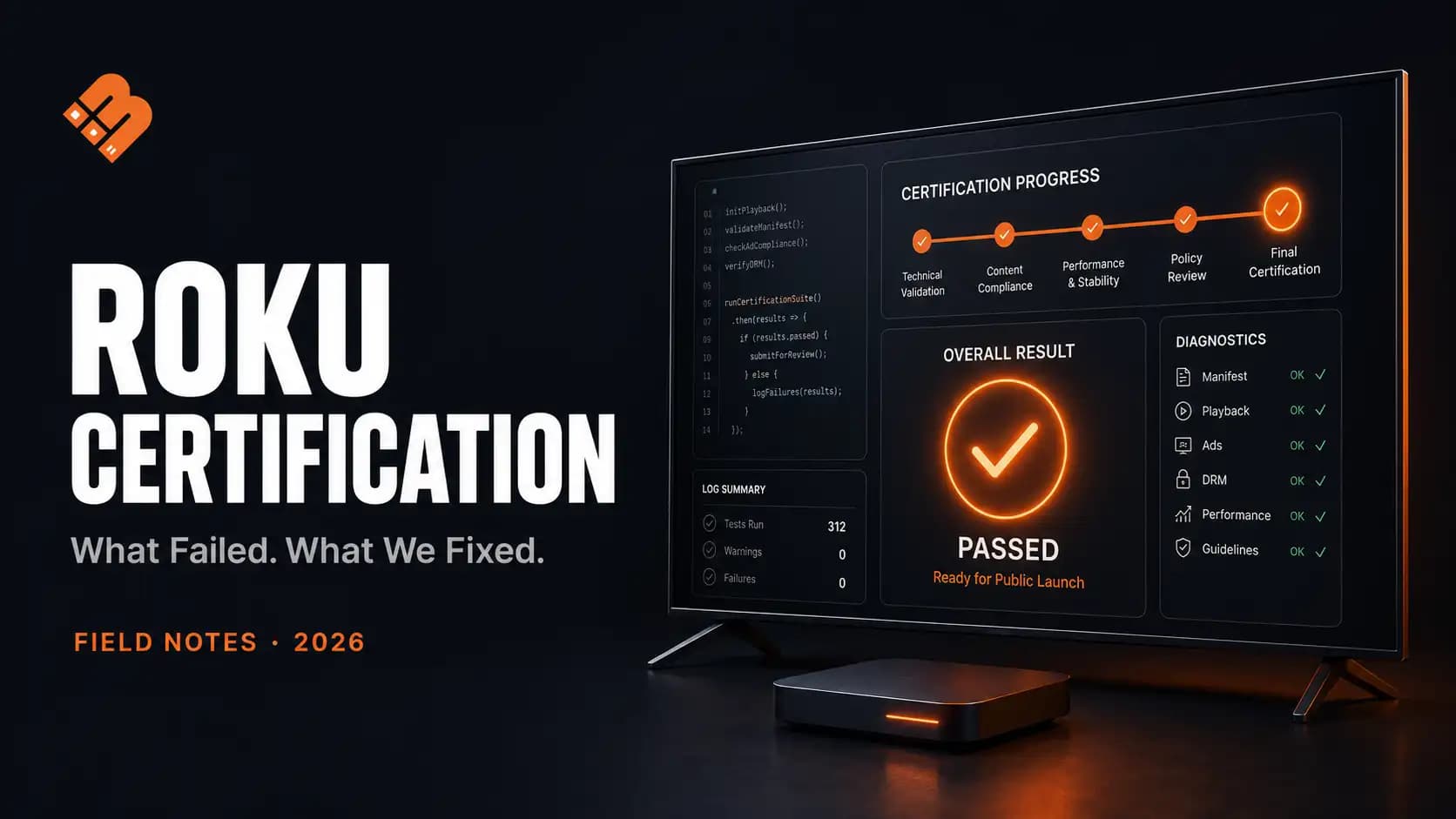
Publishing a private or beta Roku app is relatively easy. Publishing that app in the public Roku Streaming Store is a different process.
In July 2026, we took the MediaBlaster Roku VOD app through Roku’s certification process and successfully published it as a public app. The app uses WordPress as its content-management backend and supports movies, series, episodes, advertising, watch history, deep linking, and live channels.
The app worked before certification testing. That did not mean it was ready for certification.
The most time-consuming issues were not the obvious ones such as uploading artwork or entering a description. They involved the precise moment Roku considered the app launched, how deep-linked content reached the video player, how the app handled new links while already running, and what happened when content could not be played.
This article documents what we changed, why we changed it, and how we tested it.
Tested: July 2026
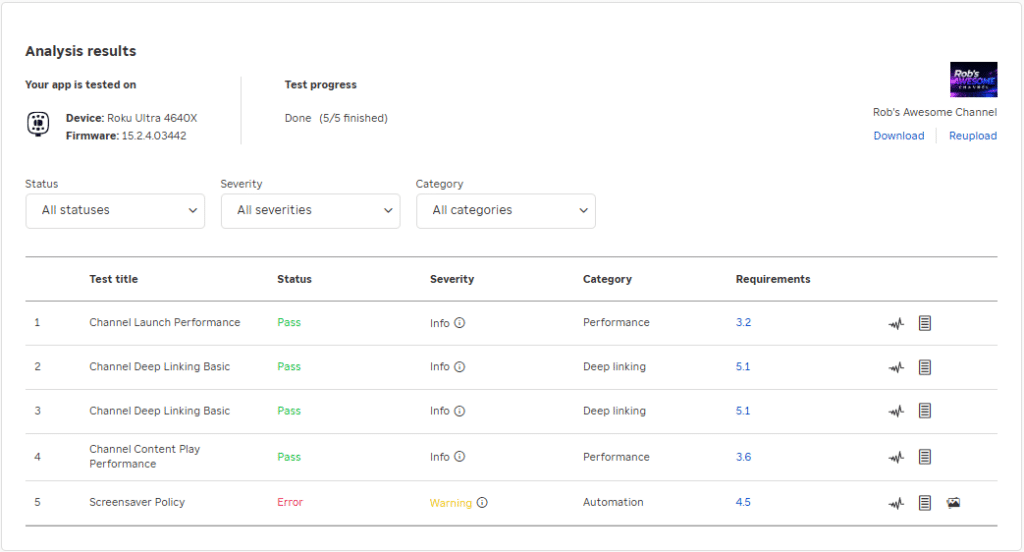
Device: Roku 4630X & Roku Ultra 4640X
App type: Roku SceneGraph video app
Backend: WordPress with the MediaBlaster REST API
Content types: Movies, series, episodes, short-form video and live channels
Deep-link identifier: Numeric WordPress post ID
Certification outcome: Approved for public publication
The short version
The four most important lessons from our certification work were:
- A Roku app is not “launched” merely because its API requests have finished.
- A deep link is not successful merely because it opens the correct screen.
- Cold-launch and runtime deep links are two different execution paths.
- Invalid or inaccessible content must fail safely without opening an empty player.
Our final implementation displays a usable app shell immediately, loads most remote content in the background, routes deep links through a dedicated resolver, and delays the deep-link launch-complete signal until the Roku video player reports a real playback state.
That architecture solved several problems at once.
What Roku certification actually checks
A public Roku app must pass certification testing and Roku’s final review before it can be published in the Streaming Store. Beta apps can be distributed to a limited group without passing certification, which is why a working beta app is not proof that a public submission will pass.
Roku currently provides several pre-certification tools:
- Static Analysis, which examines the app package and code
- App Behavior Analysis, which tests performance and deep linking
- Test automation tools for additional functional testing
Free, AVOD, and SVOD apps must pass App Behavior Analysis before they can be submitted for publication. Roku also recommends testing across devices with different processing power and memory. See Roku’s current certification criteria and app publishing guide.
The requirements that affected our implementation most directly were:
| Roku requirement | Practical meaning |
|---|---|
| Home screen rendered within 15 seconds | Do not block launch on unnecessary network requests |
| Screen transitions within 3 seconds | Display cached or local UI immediately where possible |
| Loading indicator after 3 seconds | Never leave the user staring at a frozen interface |
| Remote response within 250 milliseconds | Network work cannot block navigation |
| Playback within 8 seconds | Resolve and start media without unnecessary intermediate screens |
| Deep linking for supported media | Each declared content type needs a valid route |
| Direct to Play | A playable deep link must start content rather than stop at a details page |
| HD and FHD artwork | Both display paths need valid, nontransparent assets |
Roku’s published requirements may change, so developers should always compare an app against the current criteria before submission.
Problem 1: We were treating content loading as app launch
Our original startup flow did too much work before considering the app ready.
The app needed to:
- Load remote configuration
- Retrieve content discovery information
- Request movies and series
- Scan content tags
- Build the featured carousel
- Construct home-screen rows
- Restore watch-history information
- Establish initial focus
Some of those tasks are necessary for a fully populated home screen. They are not all necessary before showing a responsive interface.
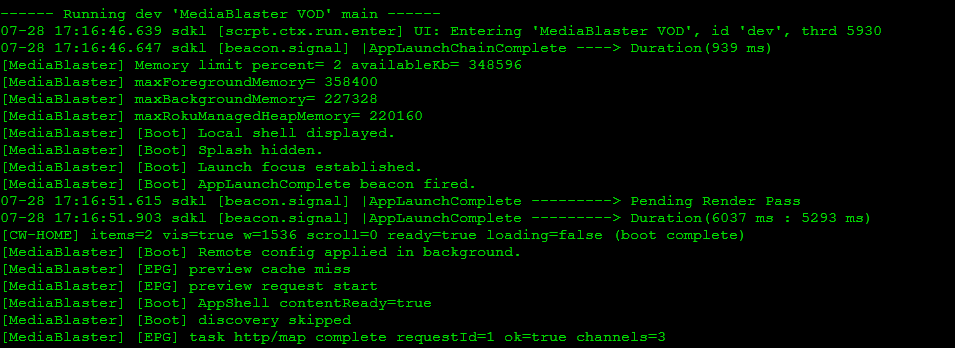
This distinction matters because Roku measures app launch using the AppLaunchComplete beacon. Roku’s certification criteria currently require apps to display a fully rendered home screen within 15 seconds.
What we changed
We divided startup into two phases.
Phase one: display a usable local shell
The app creates the SceneGraph scene, displays its local interface, hides the splash screen, establishes focus, and makes the remote responsive.
Phase two: populate the interface in the background
Remote configuration, discovery requests, content pagination, tag scanning, artwork, and dynamic rows load after the shell is usable.
The practical sequence became:
- Create the SceneGraph scene.
- Display the local app shell.
- Hide the splash screen.
- Place focus on an interactive element.
- Fire
AppLaunchComplete. - Continue loading remote data.
- Replace placeholders as content becomes available.
The key lesson was that the launch signal should represent a meaningful user-visible milestone—not the completion of every startup task.
Why this was better
Waiting for the complete WordPress catalog made startup time depend on:
- Website response time
- Catalog size
- Number of API pages
- Number of tags
- Image response time
- Network conditions
- Roku device performance
After separating shell readiness from content discovery, normal launch no longer depended on a complete home-catalog scan.
The user could see the app, move focus, and interact with the interface while secondary information continued loading.
Problem 2: A deep link reached the app but did not prove playback
Deep linking was the most complicated certification area.
A basic implementation can appear to work because the app receives a contentId and mediaType, finds an item, and opens a screen. But Roku’s Direct to Play requirement means a playable deep link is expected to start the requested content.
Opening a movie’s details screen is not equivalent to playing the movie.
Our app had to support content types including:
movieepisodeseriesseasonshortFormVideotvSpecialliveFeedsportsEvent
Each media type can require different behavior.
| Requested type | MediaBlaster behavior |
|---|---|
| Movie | Start the movie |
| Episode | Start that exact episode |
| Series | Resolve an episode and start playback |
| Season | Open the episode picker and highlight the requested episode |
| Short-form video | Start the video |
| Live feed with a current program | Start current playback |
| Live channel without a playable current program | Open the program guide on that channel |
| Unsupported or invalid request | Return safely to Home |
Roku’s certification rules require deep linking for supported media types and Direct to Play for playable content. See Roku’s certification criteria.
What we changed
For a cold-launch deep link, we stopped firing AppLaunchComplete as soon as the app shell appeared.
Instead, the app:
- Receives
contentIdandmediaType. - Sends the request to a dedicated deep-link resolver.
- Validates the resolver response.
- Maps the response to a playable Roku content object.
- Opens and focuses the video player.
- Observes the Roku
Videonode. - Waits for
bufferingorplaying. - Fires
AppLaunchCompleteonce.
This gave Roku an observable media-player event during the deep-link launch.
The relevant conceptual rule was:
Normal launch:
usable shell → AppLaunchComplete → background content loading

Playable deep-link launch:
resolve content → show player → buffering/playing → AppLaunchComplete
We also added a watchdog of approximately 12 seconds. If the requested content never reached buffering or playing, the app abandoned the pending playback path and recovered instead of waiting indefinitely.
Problem 3: We initially treated deep linking as a catalog search
The first instinct in many content apps is to retrieve a catalog and search it for the requested ID.
That approach creates several problems:
- The requested item might not be on the first API page.
- A large catalog increases lookup time.
- Search results may omit fields required for playback.
- Titles are not stable identifiers.
- Locked content may be intentionally absent from public catalog responses.
- Series and season requests require additional context.
- Live channels do not necessarily have the same structure as VOD items.
We replaced catalog scanning with a dedicated resolver endpoint:
GET /wp-json/mediablaster/v3/deep-link/{contentId}?mediaType={mediaType}
For example:
GET /wp-json/mediablaster/v3/deep-link/456?mediaType=episode
The resolver returns both the requested content and instructions about how the Roku app should handle it.
A simplified response looks like this:
{
  "content_id": "456",
  "requested_media_type": "episode",
  "behavior": "play",
  "item": {
    "id": "456",
    "title": "Example Episode",
    "media": {
      "url": "https://example.com/video.m3u8"
    }
  }
}
A season request can return parent-series information and the requested episode ID:
{
  "content_id": "456",
  "requested_media_type": "season",
  "behavior": "season",
  "series": {
    "id": "789",
    "requested_episode_id": "456",
    "season_number": 1,
    "episode_number": 3
  }
}
This made the server responsible for understanding WordPress relationships and the Roku app responsible for presenting or playing the result.
That division proved much more reliable than downloading content pages and attempting to reconstruct those relationships on the device.
Problem 4: Cold-launch links and runtime links are different
Roku can send a deep link when the app is closed or while it is already running.
Those events do not arrive through exactly the same path.
Cold-launch deep link
The app receives the launch parameters in Main(args):
sub Main(args as Dynamic)
    scene = screen.CreateScene("AppScene")

    launchArgs = ExtractDeepLinkArgs(args)

    if launchArgs <> invalid
        scene.inputArgs = launchArgs
    end if

    screen.Show()
end sub
We forward the deep-link arguments to the scene before calling screen.Show() so the app knows it is handling a deep-link launch from the beginning.
Runtime deep link
When the app is already open, the new request arrives as an roInputEvent.
That required:
input = CreateObject("roInput")
input.SetMessagePort(port)
input.EnableTransportEvents()
The event loop then extracts the new contentId and mediaType and forwards them through the same resolver and routing system used during cold launch.
The manifest also includes:
supports_input_launch=1
Preventing duplicate launch beacons
A runtime deep link should not cause the app to announce that it has launched a second time.
We added a state flag that prevents AppLaunchComplete from firing more than once during the app session.
| Event | Fire AppLaunchComplete? |
|---|---|
| Normal cold launch | Yes |
| Cold-launch playable deep link | Yes, after player activity |
| Cold-launch season link | Yes, when the picker is usable |
| Failed cold-launch deep link | Yes, after recovery to Home |
| Runtime deep link | No |
| Second runtime deep link | No |
This small state distinction prevented multiple startup paths from competing to fire the same beacon.
Problem 5: Series and season links should not behave identically
A series link and a season link can reference the same underlying episode but still require different user experiences.
For the MediaBlaster implementation:
episodestarts the exact episode.seriesresolves an episode and starts it directly.seasonopens the series episode picker and highlights the requested episode without automatically playing it.
That meant the resolver needed to return both the playable item and its series context.
We deliberately use an episode’s WordPress post ID for episode, series, and season test links. The server returns the parent series, season number, episode number, and requested episode ID when that context is required.
This avoids ambiguous title matching and provides one stable identifier from WordPress through to Roku.
Problem 6: Live channels do not behave like regular videos
A live-channel deep link may represent:
- A true live stream
- A scheduled VOD program playing as a linear channel
- A channel with no current program
- A channel with a current program the viewer cannot access
- A channel whose current item has no playable media URL
A live channel therefore cannot always return a conventional VOD item.
Our resolver can instead return:
{
  "content_id": "123",
  "requested_media_type": "liveFeed",
  "behavior": "channel",
  "channel": {
    "id": 123,
    "title": "Example Channel"
  },
  "now": {
    "current": {
      "playback_mode": "vod",
      "playback_offset": 900,
      "can_access": true,
      "content": {
        "id": 321,
        "media": {
          "url": "https://example.com/movie.m3u8"
        }
      }
    }
  }
}
The Roku app checks the channel branch before requiring an item object.
If there is a playable current program, playback begins. For scheduled VOD, playback seeks to the correct offset in the program. If no current program can be played, the app opens the EPG focused on the requested channel.
This is an important architectural difference: a live-channel deep link is sometimes a playback request and sometimes a navigation request.
Problem 7: Invalid content must fail safely
Certification work forced us to test more than successful links.
We tested:
- Nonnumeric content IDs
- Unknown IDs
- Unsupported media types
- HTTP 400 responses
- HTTP 403 responses
- HTTP 404 responses
- Missing media URLs
- Locked premium content
- Expired or unavailable content
- A second link arriving during an active resolver request
Our content IDs are positive WordPress post IDs, so the Roku app rejects nonnumeric IDs before making an API request.
If the resolver cannot return a playable item, the app does not:
- Invent a media URL
- Open a blank video player
- Remain on the splash screen
- Crash
- Search for something with a similar title
It returns to Home or displays the appropriate unavailable state.
For locked content, the original request can be retained for a future authentication retry, but the player is never started with an empty URL.
Problem 8: The Back button during ads needed special handling
Advertising introduced a less obvious navigation issue.
The Roku Advertising Framework’s showAds() method is blocking while an ad is playing. That means the regular video-screen key handler may never receive the Back-button event during the ad.
The result can be an app that appears to exit the advertisement but then resumes the main video instead of returning to the previous screen.
The correction was to use the Boolean returned by showAds():
truemeans the ad sequence completed normally.falsemeans the viewer exited, including by pressing Back.
When the method returned false, we stopped the complete ad/content loop and returned the viewer to the previous screen.
This was a good example of why remote-navigation behavior needs to be tested during every playback state—not just while the main video is playing.
The deep-link test commands we used
Roku’s External Control Protocol makes it possible to test links from another computer on the same network.
Replace the IP address and content IDs with values from your device and backend.
Cold-launch a movie
curl -d '' "http://ROKU_IP:8060/launch/dev?contentId=MOVIE_ID&mediaType=movie"
Cold-launch an episode
curl -d '' "http://ROKU_IP:8060/launch/dev?contentId=EPISODE_ID&mediaType=episode"
Test a series link
curl -d '' "http://ROKU_IP:8060/launch/dev?contentId=EPISODE_ID&mediaType=series"
Test a season link
curl -d '' "http://ROKU_IP:8060/launch/dev?contentId=EPISODE_ID&mediaType=season"
Send a link while the app is running
curl -d '' "http://ROKU_IP:8060/input?contentId=EPISODE_ID&mediaType=episode"
Test an invalid ID
curl -d '' "http://ROKU_IP:8060/launch/dev?contentId=abc&mediaType=movie"
On Windows PowerShell, use curl.exe if curl is being treated as a PowerShell alias:
curl.exe -d "" "http://ROKU_IP:8060/launch/dev?contentId=MOVIE_ID&mediaType=movie"
Our final certification test matrix
| Scenario | Expected result |
|---|---|
| Movie link | Movie starts directly |
| Short-form link | Requested video starts |
| Episode link | Exact episode starts |
| Series link | Resolver’s episode starts |
| Season link | Episode picker opens with requested episode highlighted |
| Playable live link | Current program starts |
| Live channel without current playback | EPG opens on the channel |
| Invalid ID | App recovers to Home |
| Resolver returns 400, 403, or 404 | App recovers without crashing |
| Locked item | Player does not open with an empty URL |
| Cold-launch playable link | One launch beacon after buffering or playing |
| Runtime link | Content starts without a second launch beacon |
| Two rapidly submitted links | Most recent request wins |
| Back from playback | User returns to the correct previous screen |
| Back during an advertisement | Playback exits instead of resuming after the ad |
| Normal browse and playback | Existing app behavior remains unchanged |
What we would do differently next time
The biggest mistake would be waiting until submission to think about certification.
If we were beginning another Roku app today, we would design these systems from the start:
1. Create a dedicated deep-link resolver
Do not use catalog search as a substitute for content resolution. Give the app one endpoint that can return an item, its relationships, access status, and intended behavior.
2. Define launch states explicitly
Use separate state for:
- Normal launch
- Pending cold-launch deep link
- Active deep-link resolver
- Pending deep-link playback
- Completed launch beacon
- Runtime input request
Without explicit launch states, asynchronous API results and player events can easily fire actions out of order.
3. Treat focus as part of readiness
A screen that looks complete but does not respond to the remote is not ready. Establish focus on a real interactive child before declaring a normal screen usable.
4. Build failure cases into the first test matrix
Test missing URLs, locked content, invalid identifiers, unsupported types, timeouts, and API errors before testing is otherwise “finished.”
5. Test on physical Roku hardware
A valid package and successful BrightScript compilation do not prove that remote navigation, video startup, memory usage, artwork scaling, or network timing will work on a physical device.
Roku specifically recommends testing across multiple models with different processing and memory capabilities.
6. Keep launch work separate from catalog work
A growing content library should not make the base application take longer to become responsive.
Roku certification checklist for WordPress-powered apps
Before submitting another MediaBlaster-powered Roku app, this is the condensed checklist we would use.
Package and artwork
- Confirm the title and nonzero version in the manifest.
- Increment the version for an update.
- Include HD and FHD splash assets.
- Use correctly sized, nontransparent artwork.
- Verify that the packaged app remains within Roku’s size limit.
- Remove placeholder artwork and development-only configuration.
Startup and performance
- Show a usable shell without waiting for the full catalog.
- Establish visible remote focus.
- Fire
AppLaunchCompleteat the correct milestone. - Confirm the home screen appears within Roku’s current limit.
- Show a loading indicator for visible operations taking longer than three seconds.
- Test video-start time using real media.
Deep linking
- Add
supports_input_launch=1. - Handle initial launch arguments.
- Listen for runtime
roInputEventevents. - Support each declared media type.
- Implement Direct to Play for playable items.
- Verify player activity before completing a playable deep-link launch.
- Prevent duplicate launch beacons.
- Test unavailable and unauthorized items.
Navigation and playback
- Confirm Back returns to the previous state.
- Confirm Back exits from Home.
- Test Back during advertisements.
- Verify caption behavior where applicable.
- Verify bookmarking for applicable VOD content.
- Confirm focus survives screen changes and content refreshes.
Backend
- Use stable content IDs.
- Return complete playback metadata.
- Return relationships for episodes, seasons, and series.
- Distinguish live channels from VOD items.
- Return access and availability states explicitly.
- Never require the Roku device to guess a playback URL.
Final takeaway
The most important certification lesson was that a Roku app must expose its internal state through observable user behavior.
It is not enough for the code to receive a deep link. The requested content needs to appear or play.
It is not enough for a network request to finish. The screen needs to be rendered, focused, and responsive.
It is not enough for the app to handle successful content. It needs predictable behavior when the identifier is wrong, the server is unavailable, the viewer lacks access, or the video URL is missing.
Once we started treating startup, deep linking, playback, and failure recovery as explicit state transitions, certification became much less mysterious.
MediaBlaster now uses those lessons in its Roku app architecture so creators and agencies can start from an implementation designed around real publication requirements rather than discovering them at the end of development.