MediaBlaster
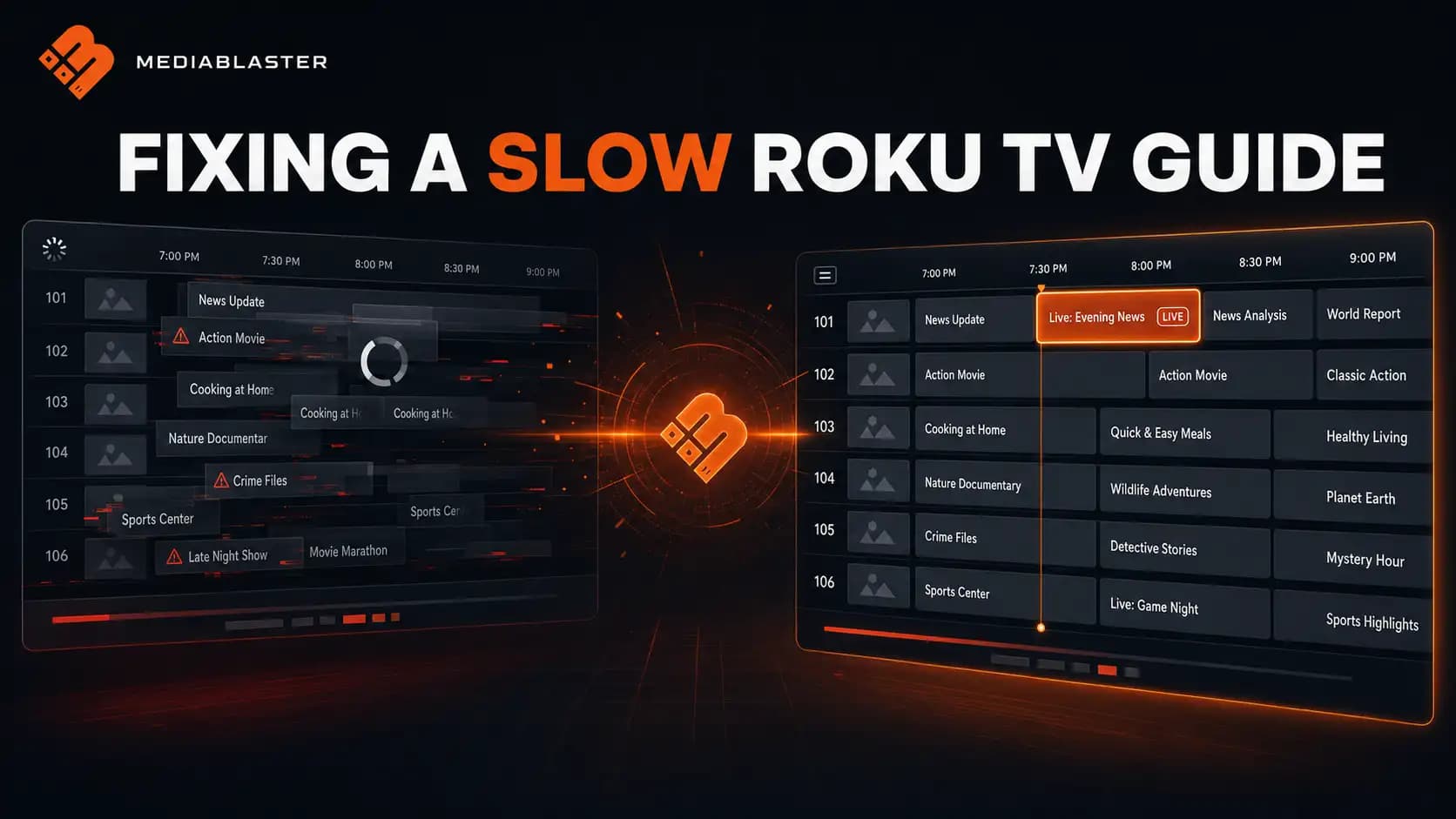
When we first connected MediaBlaster’s Live TV system to our Roku app, the result looked like a backend-data problem.
One channel appeared to contain several programs on top of one another. Other channel rows looked empty. The selected program sometimes became a large, unreadable block. Opening the guide also felt slow, and the screen did not give the viewer enough feedback to know whether it was loading or broken.
The API was returning channels and programs. The data was valid. But the guide was still nearly unusable.
What we eventually found was not one bug. It was a chain of problems across three layers:
- WordPress had to turn recurring schedules and playlists into concrete airings.
- The REST API had to return the right amount of guide data in a predictable structure.
- Roku SceneGraph had to map and render that data without overwhelming the render thread.
This article explains how our MediaBlaster Live TV guide works, what was actually wrong, how we fixed it and what we would measure before scaling it to a much larger channel lineup.
Tested: July 2026 using the MediaBlaster WordPress plugin and MediaBlaster Roku VOD template. Our validation response contained three channels: two with scheduled programs and one with no programs in the requested period.
The short version
The most visible failure came from one missing coordinate.
Every program cell was appended to a shared programHost. The cell’s horizontal position represented its start time, but its vertical position did not include the channel-row offset. Programs from every channel were therefore drawn on the first row.
The rendering fix was:
cell.translation = [
    cellX,
    row * m.rowHeight + Int(rowGutter / 2)
]
That one change separated the schedules visually, but it did not solve the entire experience.
We also changed the guide to:
- compile recurring WordPress schedules into concrete airings before the app needs them;
- query indexed airing rows instead of rebuilding schedules inside every API request;
- fetch the EPG asynchronously through a Roku
Task; - request a bounded schedule window;
- map server time so the “Now” position does not depend entirely on the Roku device clock;
- render only visible channels and programs;
- reuse a pool of SceneGraph nodes instead of constantly creating new ones;
- preserve the selected channel and program during refreshes;
- reject stale responses;
- show distinct loading, empty and error states;
- display unscheduled periods as
Off Airinstead of leaving mysterious blank space.
The larger lesson is that an EPG is not a table of text. It is a time-based application inside your application.
Why a Live TV guide is unusually demanding
A normal VOD row might show 10 or 20 posters. Each card has a predictable size, and the underlying content changes infrequently.
An electronic program guide has more moving parts:
- multiple channels;
- a continuous horizontal timeline;
- programs with different durations;
- programs clipped by the visible time window;
- past, current and future states;
- server and device time differences;
- scheduled gaps;
- vertical and horizontal navigation;
- periodic clock updates;
- periodic schedule refreshes;
- artwork for channels and programs;
- a current-time marker that keeps moving.
The grid also has to remain understandable from across a room. A technically correct schedule can still fail if focus is unclear, rows are too short, the channel column is cramped or a five-minute item turns into a two-pixel mystery.
That is why we separated the problem into four stages:
Schedule authoring
        ↓
Compiled airings in WordPress
        ↓
Bounded EPG response
        ↓
Virtualized Roku rendering
Debugging the whole system as one unit made the failures harder to see. Debugging each boundary separately made the root causes obvious.
Stage 1: Don’t calculate the entire schedule during an app request
MediaBlaster lets a publisher build playlists, place those playlists into schedule blocks and repeat them over time. That authoring model is convenient for a person, but it is not the format a Roku guide wants to consume.
The app needs concrete airings:
{
  "channel_id": 381,
  "content_id": 914,
  "starts_at": "2026-07-28T18:00:00Z",
  "ends_at": "2026-07-28T18:52:00Z",
  "title": "The Mystery Beneath the Ice",
  "duration": 3120,
  "is_live": false
}
It should not have to understand a weekly recurrence rule, expand a playlist, look up the length of each item and determine where every item lands on the clock.
We moved that work into a schedule compiler on the WordPress side.
When a channel’s schedule changes, MediaBlaster queues a compile job. The compiler:
- reads the channel’s schedule blocks;
- expands recurring blocks across the configured schedule horizon;
- detects overlapping blocks;
- expands each playlist into individual airings;
- fills eligible gaps with the channel’s fallback playlist;
- stores the resulting airings in a dedicated database table.
The compiler runs outside the viewer’s normal guide request. A throttled lazy-compile path can queue missing or dirty schedules, but the public request still reads the concrete airing table rather than performing the full expansion itself.
This distinction matters:
Authoring data describes how a schedule should be built. Delivery data describes exactly what airs at a particular time.
Trying to use the authoring model directly in a television app pushes expensive and error-prone work into the worst possible place.
Stage 2: Query an indexed time range
Compiled airings are stored with indexes that support the two questions the app asks most often:
- What is airing on this channel now?
- Which airings intersect this time window?
The schedule query uses interval intersection:
SELECT *
FROM mediablaster_channel_airings
WHERE channel_id = ?
  AND starts_at_utc < ?
  AND ends_at_utc > ?
ORDER BY starts_at_utc ASC, sequence_number ASC
The two time conditions are important. They include a program that began before the visible window but is still airing after the window starts.
A naive query such as starts_at_utc BETWEEN start AND end would omit that program and create a false gap at the left edge of the guide.
Our airing table includes indexes beginning with channel_id and either starts_at_utc or ends_at_utc. The correct indexes for another system will depend on its query plan and scale, but the principle is universal: inspect the database query that powers the guide instead of assuming the API or Roku UI is responsible for every delay.
Stage 3: Return one predictable EPG contract
The Roku screen uses one aggregate endpoint:
GET /wp-json/mediablaster/v3/epg
    ?start=2026-07-28T17:00:00Z
    &end=2026-07-29T18:00:00Z
The response contains:
- authoritative server time;
- the resolved request window;
- every enabled, EPG-visible channel in the result;
- the programs intersecting the window for each channel.
A simplified response looks like this:
{
  "server_time": "2026-07-28T17:31:22Z",
  "window": {
    "start": "2026-07-28T16:31:22Z",
    "end": "2026-07-29T17:31:22Z"
  },
  "channels": [
    {
      "channel": {
        "id": 381,
        "number": "101",
        "title": "Conspiracy TV"
      },
      "programs": [
        {
          "id": 8121,
          "content_id": 914,
          "title": "The Mystery Beneath the Ice",
          "starts_at": "2026-07-28T17:00:00Z",
          "ends_at": "2026-07-28T17:52:00Z"
        }
      ]
    }
  ]
}
We currently ask for one hour of history and 24 hours ahead. The visible Roku grid initially displays only a three-hour window beginning 30 minutes before “now.”
Those are two separate windows:
- the data window determines what is available without another request;
- the visible window determines what is actually drawn.
Keeping those ideas separate lets the viewer browse without immediately returning to WordPress, while preventing the Roku screen from drawing a full day of cells at once.
Roku’s own performance guidance warns against fetching, parsing and storing unnecessarily large data sets. If the number of channels or program density grows substantially, the next step should be to reduce or page the delivery window—not simply increase the client’s node pool. See Roku’s official optimization techniques.
Stage 4: Fetch without blocking the render thread
The EPG request runs through an ApiTask, not directly inside the UI code.
m.epgTask.control = "STOP"
m.epgTask.path = path
m.epgTask.params = {
    start: MbUtcIsoFromSeconds(startSeconds),
    end: MbUtcIsoFromSeconds(endSeconds)
}
m.epgTask.control = "RUN"
Roku’s Task node exists for asynchronous work such as downloading and parsing server data. Moving network access off the SceneGraph render thread does not make a slow endpoint fast, but it prevents the request itself from freezing the interface. Roku documents the threading model in its Task reference and threading guide.
We also assign each request a generation:
m.requestGeneration = m.requestGeneration + 1
m.activeRequestGeneration = m.requestGeneration
When the response returns, the screen verifies that it still belongs to the active generation. This protects the guide if a refresh or navigation action starts another request before the first one finishes.
if m.activeRequestGeneration <> m.requestGeneration
    LogInfo("[EPG] ignoring stale response")
    return
end if
Without this check, an older request can overwrite newer state and make the guide appear to jump backward.
The visual bug: every channel was rendered on row one
This was the most dramatic defect and the simplest one to explain after we found it.
Our program nodes all lived under the same SceneGraph group:
<Group id="programHost" translation="[220,42]" />That is a reasonable design. A shared host makes it easier to clip and position the entire timeline.
The error happened when we positioned each child. We calculated cellX from the program time but did not add the current channel row to cellY.
The result was:
- programs from multiple channels overlapping in the first row;
- blank-looking rows below it;
- several titles drawn over one another;
- focus artwork that appeared much larger than the intended program.
The corrected placement includes both dimensions:
cellX = Int((drawStart - m.visibleStartSeconds) * pxPerSecond)
cellY = row * m.rowHeight + Int(rowGutter / 2)
cell.translation = [cellX, cellY]
This is a useful debugging lesson for any custom SceneGraph grid:
If the API contains multiple rows but the screen shows only one, inspect the parent coordinate system before changing the data mapper.
We confirmed the API returned three separate channels before touching the layout. That prevented us from “fixing” correct WordPress data to compensate for a Roku positioning bug.
Render only what the viewer can see
The screen may hold a 25-hour response, but it does not need to create a node for every program in that response.
Our initial view contains:
- a three-hour time window;
- between three and seven channel rows, depending on layout;
- no more than 24 selected visible programs per row before synthetic gap cells.
For each visible channel, the renderer:
- ignores programs ending before the visible start;
- ignores programs starting after the visible end;
- clips programs that cross a window boundary;
- always retains the selected and current program when applicable;
- caps the list used for rendering;
- creates visual
Off Airgaps for uncovered periods.
The cell width is calculated from time:
pxPerSecond = timelineWidth / m.visibleDurationSeconds

drawStart = program.startSeconds
if drawStart < m.visibleStartSeconds
    drawStart = m.visibleStartSeconds
end if

drawEnd = program.endSeconds
if drawEnd > visibleEnd
    drawEnd = visibleEnd
end if

cellW = Int((drawEnd - drawStart) * pxPerSecond) - gutter
Clipping at both edges is essential. Without it, a long program that began earlier can extend underneath the channel column, while a future program can draw beyond the guide.
Reuse SceneGraph nodes
Creating and attaching SceneGraph nodes during every remote-control action is expensive and makes performance less predictable.
Instead, we maintain pools for:
- channel rows;
- program cells;
- time labels.
The pool grows only when the current layout needs more nodes:
sub EnsureProgramPool(count as Integer)
    while m.programCells.Count() < count
        cell = CreateObject("roSGNode", "EpgProgramCell")
        m.programHost.AppendChild(cell)
        m.programCells.Push(cell)
    end while
end sub
Before the next render, existing cells are cleared and rebound to the programs in the new visible window.
This reduces repeated node construction and allows navigation to behave like moving a viewport over existing data rather than rebuilding the screen from scratch.
Roku notes that SGNode field access and large data transfers between threads have measurable costs. Its data-management guide explains why node ownership, field copying and rendezvous events matter. Its Resource Monitor can show SceneGraph node counts, CPU, memory, frame rate and rendezvous activity while you test.
A blank schedule should not look like a broken schedule
One of our test channels had no programs in the requested period. Originally, that looked like a rendering failure.
We now generate non-selectable Off Air cells for gaps of at least 60 seconds. These cells exist only in the Roku presentation layer; they are not fake programs written back to WordPress.
That gives the viewer an explicit answer:
- data loaded successfully;
- the channel exists;
- there is simply nothing scheduled in this period.
The same principle applies to screen-level state. We treat these as different outcomes:
| State | Viewer message |
|---|---|
| Loading | “Loading program guide…” with a BusySpinner |
| No channels | “No Live TV channels are currently available.” |
| Request failed | “Unable to load the program guide. Press OK to retry.” |
| EPG disabled | “Live TV is not enabled for this channel.” |
| Schedule gap | Off Air inside the affected channel row |
A spinner is not a performance optimization, but it changes how the delay is understood. Roku provides a native BusySpinner component specifically for visible progress.
Fixing the hierarchy and focus treatment
Once the rows were separated, the guide still needed to read like a television interface.
We made several layout changes:
- reduced the now-playing hero from 190 to 142 logical pixels;
- increased the guide row height from 56 to 68;
- widened the channel column from 180 to 220;
- started the timeline 30 minutes before the current time;
- replaced a large solid focused-program fill with a brand-colour outline;
- removed the competing full-row focus border;
- kept a red current-time marker and a separate time chip.
These changes were not decoration. They restored hierarchy.
The viewer should be able to answer four questions immediately:
- Which channel am I on?
- Which program is selected?
- What is airing now?
- What will pressing OK do?
The original full-row border competed with the focused program. On a television, two simultaneous selection indicators create ambiguity. We kept the focused-cell ring and removed the row border.
For very narrow programs, we also suppress the dual focus ring unless the cell is wide enough. Otherwise, the focus indicator becomes a tall coloured bar with no readable content.
Keep the guide aligned with server time
The API returns server_time. The Roku app compares it to the device’s UTC time and stores the offset.
serverSeconds = MbParseLinearIsoSeconds(serverTime)
deviceSeconds = MbGetDeviceUtcSeconds()
m.serverOffsetSeconds = serverSeconds - deviceSeconds
The guide then uses server-adjusted time for:
- current-program detection;
- the vertical “Now” line;
- the current-time chip;
- initial time-window placement;
- past, current and future styles.
This does not replace correct timezone handling. Airings are stored and delivered in UTC, while labels are converted to local time for display.
The server offset simply prevents a misconfigured Roku clock or slight clock drift from moving the guide’s concept of “now” away from the backend schedule.
Refresh data and the clock at different rates
The guide has two timers:
- a 30-second clock timer;
- a five-minute data refresh timer.
The clock timer updates time-sensitive states using the data already in memory. It does not call WordPress every 30 seconds.
The refresh timer retrieves updated schedule data. Before refreshing, the screen captures the selected channel and program IDs. After the new response is mapped, it restores that selection when possible.
This separation avoids two bad extremes:
- refetching the entire EPG every time the “Now” line moves;
- letting the displayed schedule remain stale indefinitely.
It also means opening the guide again within five minutes can use the existing data instead of immediately triggering another request.
How we validated the fix
We validated each layer independently.
1. REST response
Confirm that the EPG endpoint returns:
- the expected channel count;
- distinct channel IDs;
- correctly ordered programs;
- valid UTC start and end times;
- programs intersecting the requested range;
- an empty program array when a channel legitimately has no schedule.
Example:
curl "https://example.com/wp-json/mediablaster/v3/epg?start=2026-07-28T16:00:00Z&end=2026-07-29T18:00:00Z"2. Roku mapping
Log the number of mapped channels and programs:
[EPG] loaded channels=3 programs=42If those counts match the API, the problem is likely downstream of the request.
3. Visible rows
Log the visible window, rendered rows and pool size:
[EPG] visible window start=2026-07-28T17:00:00Z channelRows=3/3 poolRows=64. Visual behavior
We confirmed:
- Conspiracy TV and Occult TV rendered on separate rows;
- their programs no longer overlapped;
- the empty UFOs and Aliens schedule rendered as
Off Air; - focus remained visible but did not consume the row;
- the initial window began 30 minutes before now;
- loading, error and empty states were visually distinct.
5. Parser and device testing
The BrightScript source was parsed with BrighterScript and then tested against the configured WordPress backend on a Roku device.
Static validation catches syntax and type problems. It cannot tell you that six correct rows were drawn at the same Y coordinate. You need both code validation and television-screen testing.
What we would measure before scaling up
We did not record a controlled before-and-after benchmark for this fix, so we are not going to invent a percentage improvement.
For a larger installation, we would capture:
- API time to first byte and total response time;
- response size in bytes;
- JSON parsing time;
- mapping time;
- first meaningful guide render;
- EPG launch metric;
- SceneGraph node count;
- render-thread CPU;
- frame rate while moving vertically and horizontally;
- memory before opening, while using and after closing the guide;
- behavior on the slowest Roku model we support.
Roku’s current performance tooling can measure an EPG launch event, and the Resource Monitor can expose CPU, memory, frames, nodes and rendezvous events. See Roku’s official guide to measuring app performance.
The important thing is to record these numbers by device class. A guide that feels excellent on a recent Roku Ultra may still struggle on lower-powered hardware.
A practical Roku EPG debugging checklist
When a Live TV guide is slow or visually wrong, work through the stack in this order.
Backend
- Are recurring schedules compiled before the viewer request?
- Are airing rows indexed by channel and time?
- Does the interval query include programs that cross the window boundary?
- Is the response window bounded?
- Does the API return server time?
- Are empty schedules represented unambiguously?
Network and mapping
- Is the request running in a
Task? - How large is the response?
- Are old responses able to overwrite new state?
- Are timestamps parsed once into seconds?
- Are channel and program IDs stable?
Rendering
- Are X and Y coordinates calculated in the correct parent coordinate system?
- Are only visible rows and programs bound to nodes?
- Are nodes reused?
- Are off-screen nodes hidden or cleared?
- Are clipped programs constrained to the viewport?
- Does a narrow program still have a usable focus treatment?
Interaction
- Is there one obvious focus indicator?
- Does focus survive a refresh?
- Do vertical navigation and horizontal time navigation remain independent?
- Does the Replay button return the guide to now?
- Do loading, empty and failure states look different?
Measurement
- Have you tested the slowest supported Roku device?
- Have you checked node count, memory, CPU, frame rate and rendezvous events?
- Have you separated API latency from render time?
- Have you tested with many channels and dense short-form schedules?
The bigger lesson
The missing row offset caused the screenshot that made the problem obvious. It was not the only thing that mattered.
A reliable EPG needs a contract between its systems:
- WordPress converts a human-friendly schedule into concrete airings.
- The database answers time-range questions efficiently.
- The REST API returns one bounded, predictable payload.
- Roku performs network work asynchronously.
- The renderer draws only the current viewport and reuses nodes.
- Explicit states tell the viewer what is happening.
If any one of those layers is vague, the television screen becomes the place where every problem appears—even when the television code did not create all of them.
That is why our debugging rule is:
Prove the schedule, prove the response, prove the mapping, then fix the pixels.
Build your Roku app with MediaBlaster
The MediaBlaster Roku Launch Kit connects a WordPress-powered streaming backend to a customizable Roku application. It includes the Roku template, MediaBlaster integration and training for configuring, testing and publishing your app.
Get the MediaBlaster Roku Launch Kit
Already using the Launch Kit? Download the latest MediaBlaster plugin and Roku template from your customer account before adding Live TV features.
Internal links to add before publishing
- Link “Roku app through certification” to We Took a Roku Channel Through Certification in 2026.
- Link “deep-link a live channel” or the Live TV section to Roku Deep Linking in 2026: The Complete Implementation and Testing Guide.
- When published, link “WordPress converts a human-friendly schedule” to How WordPress Feeds a Modern Roku App.
- When published, link “first meaningful render” to Roku Startup Performance: What We Changed.
Original screenshots and graphics to capture
- The broken EPG showing programs stacked on row one.
- The corrected guide with at least three channel rows.
- A side-by-side crop identifying the missing Y offset.
- The MediaBlaster WordPress channel scheduler.
- A sanitized
/epgresponse in Postman. - The Roku loading state with
BusySpinner. - An
Off Airchannel row. - Roku console logs showing channel, program and visible-row counts.
- Roku Resource Monitor during vertical and horizontal guide navigation.
Editorial verification before publishing
- Replace
https://example.comin the cURL example with a safe public demo endpoint or leave it generic. - Confirm the final public Launch Kit URL and replace
/roku-launch-kitif necessary. - Add the tested Roku device model(s) and Roku OS version(s).
- Capture a measured response size and EPG launch time if performance numbers are added.
- Do not publish private backend URLs, API keys, license keys or customer content in screenshots.